|
CATIA V5 Drafting : Drafting
thomasacro am 22.01.2010 um 19:11 Uhr (0)
Hi Magic.Welche brauchst Du denn? Da gibts -zigtausende!!Und was denn nun, DIN, oder ISO? ;-)------------------gruß, Tom
|
| In das Form CATIA V5 Drafting wechseln |
|
CATIA V5 Drafting : seltsame Ansicht nach Ableitung
MICHLICK am 19.04.2010 um 07:47 Uhr (0)
Ja, da hätte ich mal besser die Doku gelesen.Das macht halt CATIA so.Hier die Antwort von Dassault (ich Dummerchen): Zitat:This problem can be reproduced here at DS on the all CATIA levels. This problem can be clsoed as "User Error" because there is a clash in the 3D Design between the component named ‘Body_abrasion_protection’ and the component named ‘Body_pressure_hose’. The clash between the two components lead to incorrect representation in the Drawing. The presence of a clash is a restriction of the p ...
|
| In das Form CATIA V5 Drafting wechseln |
|
CATIA V5 Drafting : Zusammenfügen von Splines
Mörchen am 21.09.2009 um 13:30 Uhr (0)
Hi funkstille,im Drafting gibts den nicht. Du wirst einen Spline im GSD über die beiden legen müssen und den dann ableiten.GruMörchen
|
| In das Form CATIA V5 Drafting wechseln |
|
CATIA V5 Drafting : Maße aus Part in Drawing
MICHLICK am 15.09.2009 um 13:26 Uhr (0)
Hallo brunetti,die Lösung ist in den Tools/Optionen/Drafting/View.Dort "Project 3D wireframe" aktivieren.------------------Gruß Michael B.
|
| In das Form CATIA V5 Drafting wechseln |
|
CATIA V5 Drafting : Rippe wird in Drafting geschnitten
bgrittmann am 16.03.2009 um 14:40 Uhr (0)
ServusBitte Suche verwenden (zB hier)GrußBernd------------------Warum einfach, wenn es auch kompliziert geht.
|
| In das Form CATIA V5 Drafting wechseln |
|
CATIA V5 Drafting : Siehe Ansicht anbei
wvdail am 24.08.2005 um 15:18 Uhr (0)
Hallo Catianer,habe da ein Problem wie kann ich im Drafting V5 dazu bringen die Toleranz mit in den Rahmen zu nehmen.Gruß Dieter
|
| In das Form CATIA V5 Drafting wechseln |
|
CATIA V5 Drafting : Bemaßungsdarstellung
stuli am 30.04.2004 um 12:27 Uhr (0)
Hallo Borstel, versuchs doch mal mit Tools - Optionen - Mechanische Konstruktion - Drafting - Geometrie - Farben und click dort die Diagnosedarstellung auf aus. Gruß Uli
|
| In das Form CATIA V5 Drafting wechseln |
|
CATIA V5 Drafting : Maße aktualisieren
hatsch am 28.11.2004 um 19:34 Uhr (0)
Nach Änderung des 3D Modells im PartD. und Aktualisierung im Drafting wird die Bemaßng nicht angepaßt! Kann mir bitte jemand helfen?
|
| In das Form CATIA V5 Drafting wechseln |
|
CATIA V5 Drafting : Schnitt
amenam am 21.02.2007 um 16:33 Uhr (0)
Wenn du in der Baugruppe in die Properties des Parts (z.B.einer Schraube)gehst, kannst du unter Drafting "do not cut in section views" auswählen (siehe Anhang)!
|
| In das Form CATIA V5 Drafting wechseln |
|
CATIA V5 Drafting : Bedingungen/Bezug auf andere Skizze nehmen
Lionel Hutz am 01.08.2017 um 09:40 Uhr (1)
Wir sind hier im Drafting-Forum. Bei R24 fehlt da die dritte Dimension. Ich warte mal auf die Reaktion von Marvin.
|
| In das Form CATIA V5 Drafting wechseln |
|
CATIA V5 Drafting : Drafting - Zeichnungsfehler
ThePhantom am 14.05.2010 um 12:09 Uhr (0)
Ok anscheinend geht es wirkilch nur im Standart Modus... Naja dann muss ich wohl die Zahnräder nochmal machen die ich bis jetzt habe...
|
| In das Form CATIA V5 Drafting wechseln |
 |
CATIA V5 Drafting : CATIA V5 stürzt beim Öffnen von Drafting ab
Randle am 27.06.2022 um 13:31 Uhr (1)
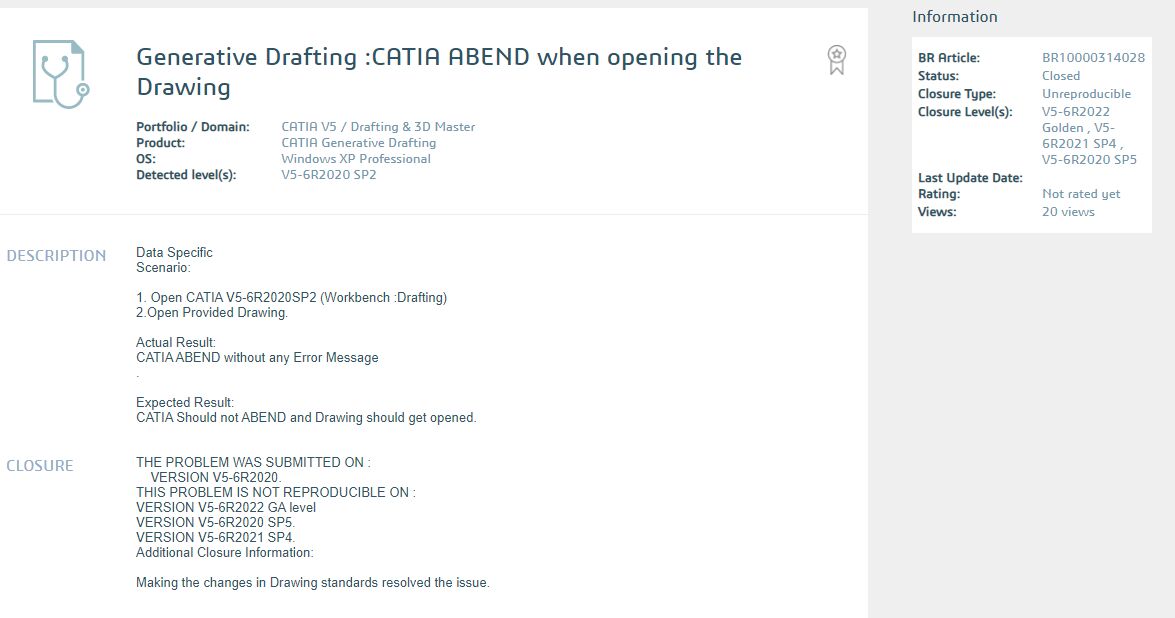
Hört sich nach diesem Problem an (siehe Anhang).------------------Wer für nichts steht, fällt für alles!
|
| In das Form CATIA V5 Drafting wechseln |
|
CATIA V5 Drafting : CATIA V5 stürzt beim Öffnen von Drafting ab
bgrittmann am 27.06.2022 um 12:28 Uhr (1)
ServusVielleicht hilft das hier weiter.GrußBernd------------------Warum einfach, wenn es auch kompliziert geht.
|
| In das Form CATIA V5 Drafting wechseln |