|
CATIA V5 Programmierung : Flexible/ Rigid SubAssembly
JuPaV am 11.11.2010 um 15:32 Uhr (0)
Hallo! Antwort laut: flexible Unterbaugruppe kann nicht fixieren.Hier ist ein Beispiel:Sub CATMain()Set oProd = CATIA.ActiveDocument.ProductSet Constrs = oProd.Connections("CATIAConstraints")For i = 1 To oProd.Products.Count sVaterName = oProd.Name sUnterProdName = oProd.Products.Item(i).Name sRefName = sVaterName & "/" & sUnterProdName & "/!" & sVaterName & "/" & sUnterProdName & "/" Set oRef = oProd.CreateReferenceFromName(sRefName) On Error Resume Next Set Constr = Constrs.AddMonoEltCst(catCstTyp ...
|
| In das Form CATIA V5 Programmierung wechseln |
|
CATIA V5 Programmierung : Verdeckte Parameter löschen
JuPaV am 12.11.2010 um 12:17 Uhr (0)
Hallo! Versucht so:Sub CATMain()Set aDoc = CATIA.ActiveDocumentSet selection3 = aDoc.Selectionselection3.Search "(CATKnowledgeSearch.Set of parameters),all" If selection3.Count 0 Then Set params = selection3.Item(1).Value If params.AllParameters.Count 0 Then For i = 1 To params.AllParameters.Count Set param = params.AllParameters.Item(i) If param.Hidden Then param.Hidden = False End If Next End If selection3.Delete selection3.Clear Else If sele ...
|
| In das Form CATIA V5 Programmierung wechseln |
|
CATIA V5 Programmierung : Makro gibt nur Zahlenwerte aus keine Buchstaben
JuPaV am 05.07.2011 um 17:57 Uhr (0)
Hallo Du kannst nicht.Schau mal Methods: Zitat:o Sub SetLayer( CatVisLayerType iLayerType, long iLayerValue) Sets the layer for the current selection. Note: This property is global for the object. Parameters: iLayerType the type of the layer iLayerValue A value between 0 to 1000 This parameter is used only when the type of the layer is catVisLayerBasic. ------------------Mit freundlichen Grüßen,JuPaV
|
| In das Form CATIA V5 Programmierung wechseln |
|
CATIA V5 Programmierung : Catia V5 - 3D-Linie mittels VBA strichelen und einfärben
JuPaV am 16.11.2010 um 16:35 Uhr (0)
Hallo! Das ist einfach:CATIA.ActiveDocument.Selection.Add Line line SelectionSet visProperties1 = CATIA.ActiveDocument.Selection.VisProperties visProperties1.SetRealColor 0, 128, 0, 1 FarbevisProperties1.SetRealLineType 4, 1 Line TypevisProperties1.SetRealWidth 4, 1 Dick Line------------------Mit freundlichen Grüßen,JuPaV
|
| In das Form CATIA V5 Programmierung wechseln |
|
CATIA V5 Programmierung : Join einfärben
JuPaV am 08.12.2010 um 13:58 Uhr (0)
Hallo! code:-----------------------CATIA.ActiveDocument.Selection.Add Join line SelectionSet visProperties1 = CATIA.ActiveDocument.Selection.VisPropertiesvisProperties1.SetRealColor 0, 128, 0, 1 FarbevisProperties1.SetRealLineType 4, 1 Line TypevisProperties1.SetRealWidth 4, 1 Dick Line-----------------------------------------Mit freundlichen Grüßen,JuPaV
|
| In das Form CATIA V5 Programmierung wechseln |
 |
CATIA V5 Programmierung : Join einfärben
JuPaV am 08.12.2010 um 16:28 Uhr (0)
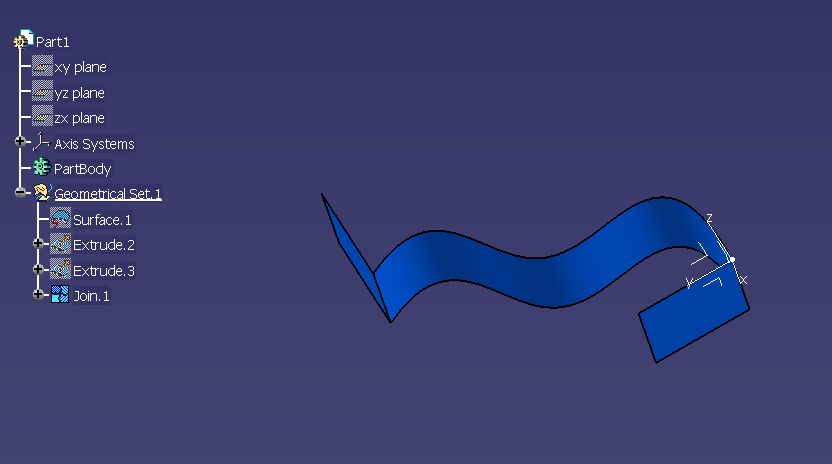
code:------------------------------------Sub CATMain()Set oPart = CATIA.ActiveDocument.PartSet HBodies = oPart.HybridBodiesSet HB = hybridBodies1.Item("Geometrical Set.1")Set HShapes = HB.HybridShapesSet Join_ = HShapes.Item("Join.1")Dim Selection1 As SelectionSet Selection1 = CATIA.ActiveDocument.SelectionSelection1.ClearSelection1.Add Join_Selection1.VisProperties.SetRealColor 0, 100, 255, 1End Sub-----------------------------------------------------------Mit freundlichen Grüßen,JuPaV
|
| In das Form CATIA V5 Programmierung wechseln |
|
CATIA V5 Programmierung : auf koordinaten zugreifen!!!!
JuPaV am 19.07.2011 um 10:28 Uhr (0)
Hallo Du kannst AxisSystem messen und Koordinaten auslesen.Hier ist ein Beispiel:Code:Sub CATMain()Set oPart = CATIA.ActiveDocument.PartSet ASys = oPart.AxisSystems.Item("Axis System.2")Set oRef = oPart.CreateReferenceFromObject(ASys)Set TheSPAWorkbench = CATIA.ActiveDocument.GetWorkbench("SPAWorkbench")Set TheMeasurable = TheSPAWorkbench.GetMeasurable(oRef)Dim Components(11)TheMeasurable.GetAxisSystem ComponentsEnd Sub------------------Mit freundlichen Grüßen,JuPaV
|
| In das Form CATIA V5 Programmierung wechseln |
|
CATIA V5 Programmierung : Erweiterte Stückliste Blechteile
JuPaV am 26.07.2011 um 16:31 Uhr (0)
Hallo! Versuch es mal so :Code:Sub Test()Set oProd = CATIA.ActiveDocument.ProductDim sPfad As StringsPfad = CATIA.ActiveDocument.PathDim AssemblyConvertor As AssemblyConvertorSet AssemblyConvertor = oProd.GetItem("BillOfMaterial")Dim arrayOfVariantOfBSTR1(2)arrayOfVariantOfBSTR1(0) = "Part Number"arrayOfVariantOfBSTR1(1) = "Type"arrayOfVariantOfBSTR1(2) = "Quantity"Set AssConVariant = AssemblyConvertorAssConVariant.SetCurrentFormat arrayOfVariantOfBSTR1Dim arrayOfVariantOfBSTR2(2)arrayOfVariantOfBSTR2(0) ...
|
| In das Form CATIA V5 Programmierung wechseln |
|
CATIA V5 Programmierung : Relationsets erzeugen
JuPaV am 29.06.2011 um 08:57 Uhr (0)
Hallo! Die die Umrennung der Sets geht so.Code:Sub CATMain()Set oDoc = CATIA.ActiveDocumentSet partDoc = oDoc.PartSet oPara = partDoc.ParametersSet oRel = partDoc.Relations Erzeugen des Relation-Sets unter dem ersten Geo-SetoRel.CreateSetOfRelations (partDoc.HybridBodies.Item("Geometrical Set.4")) Erzeugen des Relation-Sets unter RelationsoRel.CreateSetOfRelations (oRel.GetItem("Relations"))Set osel = CATIA.ActiveDocument.Selectionosel.Search "CATKnowledgeSearch.AdvisorRelationSet,all"If osel.Count 0 The ...
|
| In das Form CATIA V5 Programmierung wechseln |
|
CATIA V5 Programmierung : flexible Komponente
JuPaV am 20.04.2011 um 10:30 Uhr (0)
Hallo! Code:Sub Main()Komponent Selektion dannCATIA.DisplayFileAlerts = False CATIA.StartCommand ("Flexible/Rigid Sub-Assembly")End Sub------------------Mit freundlichen Grüßen,JuPaV
|
| In das Form CATIA V5 Programmierung wechseln |
|
CATIA V5 Programmierung : User Selection
JuPaV am 10.04.2012 um 15:31 Uhr (0)
Hallo Deine Selektion Name ist falsch.Code:Dim osel As SelectionSet osel = CATIA.ActiveDocument.Selectionosel.ClearDim FDim Was(0)Was(0) = "HybridShapeSurfaceExplicit"F = osel.SelectElement2(Was, "test", False)------------------Mit freundlichen Grüßen,JuPaV
|
| In das Form CATIA V5 Programmierung wechseln |
|
CATIA V5 Programmierung : Erweiterte Stückliste Blechteile
JuPaV am 28.07.2011 um 09:23 Uhr (0)
Hallo! 1. Nein, gibt es keine ähnliche Funktion für "Measure Inertia" 2.Weitere Informationen zum "AssemblyConvertor" kannst du her bekommen: http://www.catiadesign.org/_doc/catia/catia_vb/generated/interfaces/ProductStructureInterfaces/interface_assemblyconvertor.htm ------------------Mit freundlichen Grüßen,JuPaV
|
| In das Form CATIA V5 Programmierung wechseln |
|
CATIA V5 Programmierung : Bohrungsabstand
JuPaV am 13.04.2011 um 10:38 Uhr (0)
Hallo spidermat! Code:Sub CATMain()Set odoc = CATIA.DocumentsSet oPart_01 = odoc.Item("Part1.CATPart").PartSet oBody_01 = oPart_01.MainBodySet oHole_01 = oBody_01.Shapes.Item("Hole.1")Set GeoElements = oHole_01.Sketch.GeometricElementsSet oPoint_01 = GeoElements.Item("Point.1") point Part.1Set oref_01 = oPart_01.CreateReferenceFromObject(oPoint_01) Reference Point.1Set oPart_02 = odoc.Item("Part2.CATPart").PartSet oBody_02 = oPart_02.MainBodySet oHole_02 = oBody_02.Shapes.Item("Hole.1")Set GeoElements = ...
|
| In das Form CATIA V5 Programmierung wechseln |