 |
ELCAD : Import Excel or TXT file into ELCAD
padfoot am 03.06.2013 um 13:10 Uhr (0)
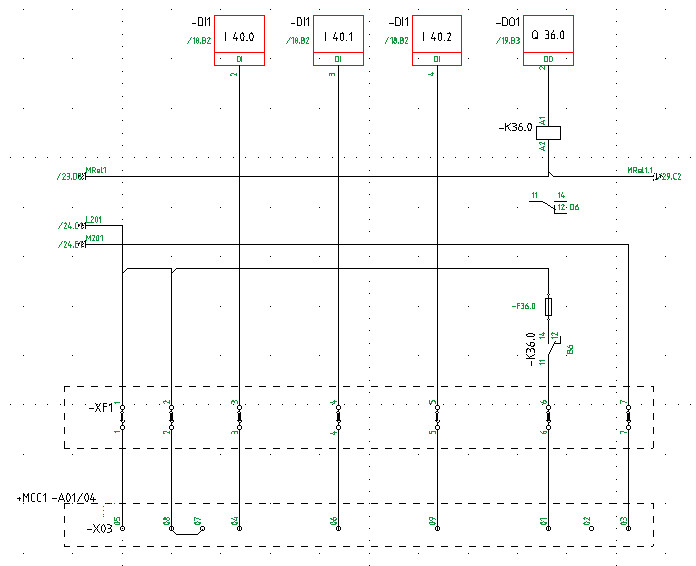
Hi again.I have another question. Ive attached a sample page of my ELCAD project.I want to add signal names and signal comments for each DI/DO.Signal names and comments are in an excel file.How can I import it to ELCAD?Thanks for your help.
|
| In das Form ELCAD wechseln |
|
ELCAD : A Program to Insert Line Breaks (#) Automatically in ELCAD
padfoot am 16.06.2013 um 06:57 Uhr (0)
Ill write a German translation of my post in next post! (Google Translate)Zitat:Ich werde eine deutsche Übersetzung von meinem Beitrag in der nächsten Post zu schreiben! (Google Translate)----------------------------------------------------------------Hi all.Thank you for supporting me in this forum.Ive written a C# program for inserting line breaks automatically in Excel.And now, I want to share it with you! Working with it is very easy. You need to browse for the location of your excel file (*.xlsx), th ...
|
| In das Form ELCAD wechseln |
|
ELCAD : A Program to Insert Line Breaks (#) Automatically in ELCAD
padfoot am 16.06.2013 um 06:58 Uhr (0)
Hallo alle.Danke für die Unterstützung in diesem Forum.Ich habe ein C #-Programm zum Einfügen Zeilenumbrüche automatisch in Excel geschrieben.Und jetzt will ich es mit Ihnen teilen! Arbeiten mit ihm ist sehr einfach. Sie müssen sich für den Standort Ihrer Excel-Datei (*. Xlsx) zu sehen, dann schreiben Sie das Blatt Namen Ihrer Daten in "ExcelSheet Name" Textfeld."Wrap Word" bedeutet, dass der Zeilenumbruch (#) am Ende der Wörter muss eingefügt, nicht Mitte von ihnen."Line Length" ist die Anzahl der Zeichen ...
|
| In das Form ELCAD wechseln |
|
ELCAD : Import Excel or TXT file into ELCAD
padfoot am 03.06.2013 um 13:45 Uhr (0)
Thank you for your answer.Im from UAE but Im not there for now!So, where is this "online help" that you mentioned?And what is the "PLC List"?Thanks.
|
| In das Form ELCAD wechseln |
|
ELCAD : Import Excel or TXT file into ELCAD
padfoot am 10.06.2013 um 09:03 Uhr (0)
Thanks you very much.You helped me a lot!Im gonna to write a program to do this automatic!Thank you again.
|
| In das Form ELCAD wechseln |
|
ELCAD : Import Excel or TXT file into ELCAD
padfoot am 16.06.2013 um 07:15 Uhr (0)
Ive made a program for doing this.Find it here:http://ww3.cad.de/foren/ubb/Forum38/HTML/003724.shtmlThank you.
|
| In das Form ELCAD wechseln |
|
ELCAD : Import Excel or TXT file into ELCAD
padfoot am 10.06.2013 um 08:41 Uhr (0)
Hi.No, I meaned does ELCAD do this automatically for long lines?
|
| In das Form ELCAD wechseln |
|
ELCAD : Import Excel or TXT file into ELCAD
padfoot am 03.06.2013 um 14:08 Uhr (0)
Thank you for your help. I can import symbol table.Now, how can I show these symbols and comments on each DI/DO addresses?
|
| In das Form ELCAD wechseln |
|
ELCAD : Import Excel or TXT file into ELCAD
padfoot am 08.06.2013 um 10:53 Uhr (0)
HiThank you. I did it finally!Now, how can I split my texts? They are too long for displaying in one line. How can I split them into multiple lines?
|
| In das Form ELCAD wechseln |
|
ELCAD : Import Excel or TXT file into ELCAD
padfoot am 03.06.2013 um 14:11 Uhr (0)
And Ive got this error message repeatedly in error file:"Can not find field limitations."What is this and how can I fix this?Thanks.
|
| In das Form ELCAD wechseln |
|
ELCAD : Import Excel or TXT file into ELCAD
padfoot am 05.06.2013 um 13:44 Uhr (0)
I didnt use "import protocol", I used "Import PLC".I chose "S7" then insert the address of ".sdf" file. (Which I exported from symatic manager, Symbol table editor)Then ELCAD asked for a location for "error file". (I chose desktop)Then import process begins. There was no place to choose "field separator" and any other options.It seemed import ends successfully, because ELCAD shows my symbol table.But when I opened that "error file" I mentioned before, the message "Can not find field limitations." repeated ...
|
| In das Form ELCAD wechseln |
|
ELCAD : Import Excel or TXT file into ELCAD
padfoot am 07.06.2013 um 11:54 Uhr (0)
Hi.Ive imported my PLC file as this name: "S7-SymbolTable". ("View menu" - Input/Output Components - Right Click - New - ... - "File menu" - Import PLC - S7 - ...)Now, I should go to "Extras Menu" - Options - (User/Project) - Assignment List."Assignment List" section has 2 parts:1: Assignment List Function = 7.32: Assignment List Function 7.3(Like the picture that BODO_M uploaded: http://ww3.cad.de/foren/ubb/uploads/Bodo_M/plc_config.jpg)By default, the 2nd option (7.3) is activated, and when I open "Desi ...
|
| In das Form ELCAD wechseln |