|
EPLAN Electric P8 : Beschreibender Einbauort
bgischel am 10.03.2010 um 19:51 Uhr (0)
Ja das ist momentan leider so. Diese (einzelne) Eigenschaft fehlt leider (noch). Ist Eplan aber bekannt...------------------ P8 Magic | P8 FAQs | Eplan Downloads | Historie | Hilfe | Suchen | Finden | Fragen | Geprüft
|
| In das Form EPLAN Electric P8 wechseln |
|
EPLAN Electric P8 : Artikelverwaltung und -auswahl
bgischel am 21.01.2010 um 06:51 Uhr (0)
Moin... da gibt es keinen Trick. Müßtest Du Eplan fragen ob sie diese Eigenschaften mit in die Liste aufnehmen... ------------------ P8 Magic | P8 FAQs | Eplan Downloads | Historie | Hilfe | Suchen | Finden | Fragen | Geprüft
|
| In das Form EPLAN Electric P8 wechseln |
|
EPLAN Electric P8 : EPLAN Education Makros in Vollversion konvertieren
ThMue am 23.08.2021 um 15:38 Uhr (1)
EPLAN Support damit beauftragen. die ham nen Tool. ham wir auch vor Jahren auch an der Hochschule gemacht.------------------Vorlesungen machen den Verstand träge. Sie zerstören das Potenzial für authentische Kreativität!
|
| In das Form EPLAN Electric P8 wechseln |
 |
EPLAN Electric P8 : Stammdaten 2.6
HOC am 11.09.2016 um 10:22 Uhr (3)
Hallo laut Eplan News 2.6 wurden wieder einige Symbole überarbeitetz.B. Hilfslinie hinzugefügtWarum schafft es EPLAN nicht automatisch eine Hilfslinie zu generieren zu den rechts vom Symbol platzierten Hilfskontakten? ------------------GrüßeHOC
|
| In das Form EPLAN Electric P8 wechseln |
|
EPLAN Electric P8 : Graviertextwiedergabe im Klemmenanschlußplan
bgischel am 22.05.2007 um 13:55 Uhr (0)
Dann einfach eine Mail an den support-eplan@eplan.de mit den Fragen oder Problemen (Dongelnummer bereithalten)...------------------ Download | Historie | Das WTC lebt... | Cad.de Hilfe - hier! | Alte Suche - hier! | Wo bist Du?
|
| In das Form EPLAN Electric P8 wechseln |
|
EPLAN Electric P8 : Eplan hängt ?!
EPLAN-Buesgen am 20.11.2008 um 16:04 Uhr (0)
@ korgli - ja, hatte ich gesehen, aber ich dachte das wäre am ende wegen des viewers und nicht multiuser gwesen@j-st - das vermute ich auch mal. aber ich kenne leider niemanden, der so etwas macht.
|
| In das Form EPLAN Electric P8 wechseln |
|
EPLAN Electric P8 : Option Kopieren und Einfügen
Baliet am 04.02.2014 um 11:23 Uhr (1)
Hallo zusammen!Ich bin es von Eplan 5.70 gewohnt, wenn ich mehrere Sachen kopiert habe, Diese hinterher einzufügen, dabei kann ich die letzten Kopien aussuchen.Wo kann ich das bei EPLAN P8 einstellen? ------------------A.B
|
| In das Form EPLAN Electric P8 wechseln |
|
EPLAN Electric P8 : Artikeldatenbank
Shrek77 am 07.03.2017 um 10:54 Uhr (1)
Hi,mit welcher EPLAN Version arbeitest du momentan?Nutzt du die .mdb oder schon eine SQL Datenbank?Wenn .mdb, hast du dir keine eigene Datenbank angelegt die einen anderen Namen trägt als die Beispieldatenbank von EPLAN?
|
| In das Form EPLAN Electric P8 wechseln |
|
EPLAN Electric P8 : Preise aus dem SAP ins Eplan?
ElektroKlaus am 16.04.2013 um 15:07 Uhr (0)
Hallo,von EPLAN gibt es ein Tool dafür. Es nennt sich ERP/ PDM Integration Modul, oder so ähnlich. Damit sollte man so was automatisiert machen können.Frag mal den EPLANer Deines Vertrauens.VG,ElektroKlaus
|
| In das Form EPLAN Electric P8 wechseln |
 |
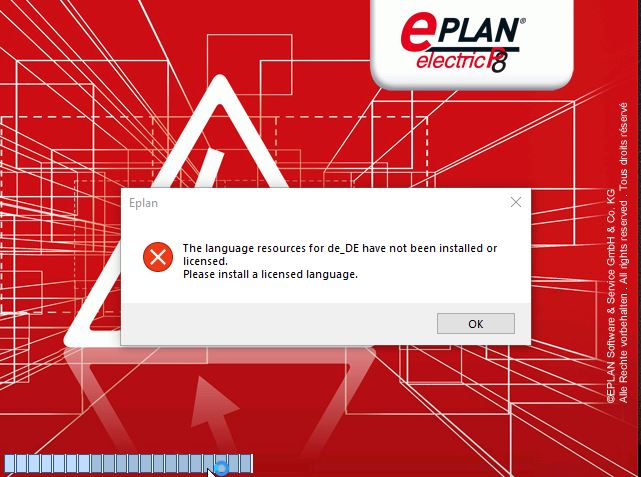
EPLAN Electric P8 : Eplan Startet nicht
HOC am 02.06.2022 um 11:12 Uhr (13)
Zitat:Original erstellt von EPLAN kurz erklärt:..hoch gezogen auf Update 10 ..Hallo,hab lange gewartet mit Update10, aber jetzt installiertUND KANN NICHT GESTARTET WERDEN !!------------------GrüßeHOC
|
| In das Form EPLAN Electric P8 wechseln |
 |
EPLAN Electric P8 : Office 64 bit wird nicht erkannt
pxecad am 18.09.2019 um 13:59 Uhr (15)
Sehr gut ------------------* * * EPLAN Infoportal 2019 -- Hilfeportal & Informationen zur EPLAN Installation (32Bit/64Bit/SQL/Helpsystem) * * * Viele Informationen zum Lizenzumstieg habe ich auch hier gefunden:www.smartineer.com
|
| In das Form EPLAN Electric P8 wechseln |
|
EPLAN Electric P8 : Suche Link zum Dokument mit den verschiedenen Eplan-Versionen
Inematov am 03.04.2018 um 08:20 Uhr (1)
Hallo MichaelFrage dazu am besten bei deiner EPLAN Niederlassung an, die können dir das am besten beantworten. Ich habe nur die relativ kurz gehaltene im Anhang.Gruss Roman
|
| In das Form EPLAN Electric P8 wechseln |
|
EPLAN Electric P8 : ePLAN P8 Artikelverwaltung mit Symbol oder Makro
gneolf am 11.03.2014 um 13:16 Uhr (15)
Ahhhhh, da war der Fehler, ich hatte das Makro im Reiter "Montagedaten" hinterlegt.Danke für deine Hilfe. Ich hoffe das ist jetzt der richtige Weg unsere Stammdaten in ePLAN zu bekommen.GrußFlo
|
| In das Form EPLAN Electric P8 wechseln |